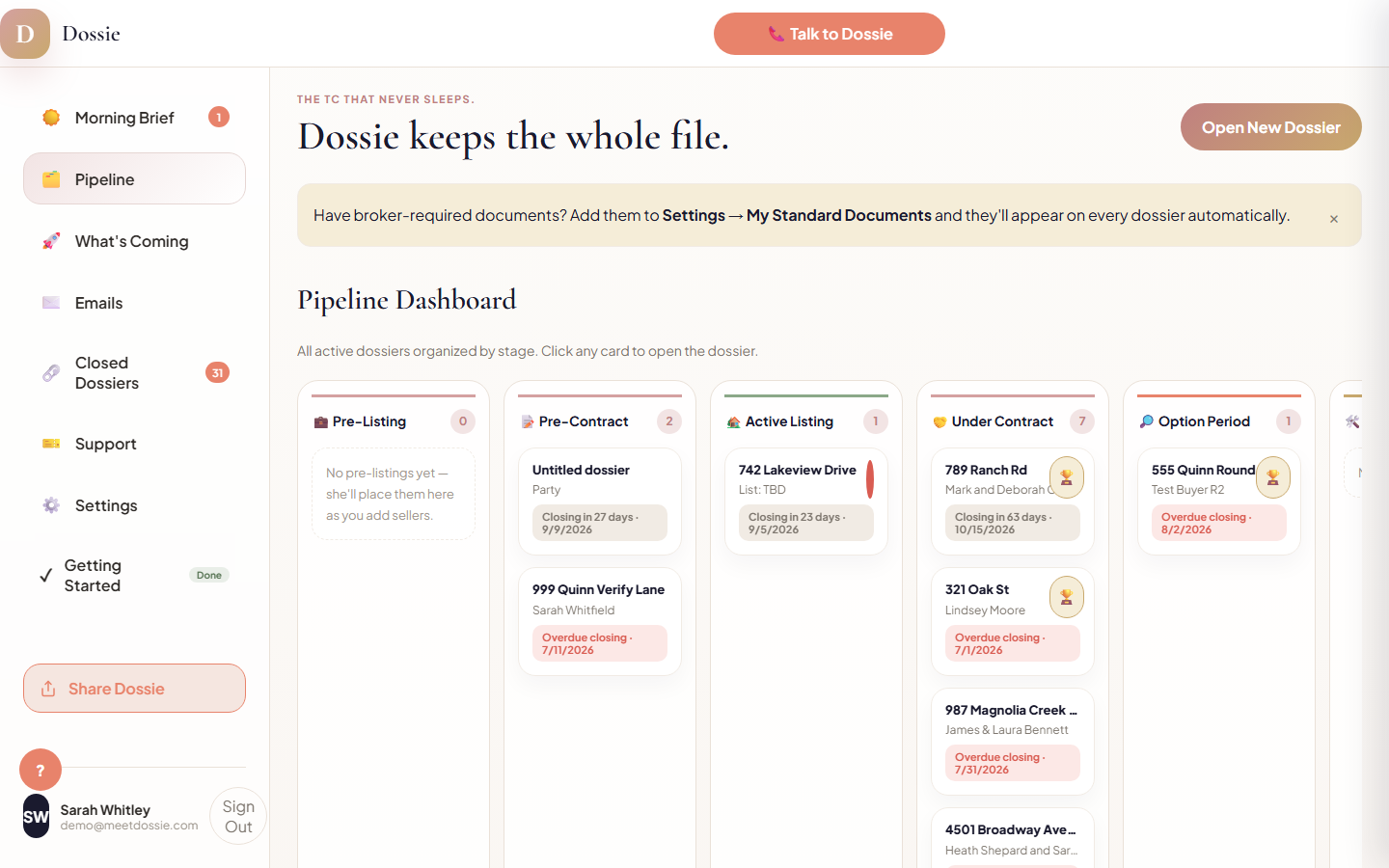
Before an agent can manage forty open files, they have to be able to see them. Dossie's Pipeline Dashboard is the screen an agent lands on after Morning Brief — every active dossier laid out in columns by stage, from Pre-Listing through Clear to Close, with each card showing the property, the other party, and the next thing that's due.
1. Nine stages, one board
Pre-Listing, Pre-Contract, Active Listing, Under Contract, Option Period, Inspection, Financing, Title & Survey, and Clear to Close each get their own column. A dossier moves left to right as the deal progresses; nothing has to be re-entered or re-filed to change columns.
2. Each card shows what's next, not just what's open
Every card carries the property address (or client names if the address isn't set yet), the counterparty, and the nearest upcoming deadline. A deadline within 3 days shows red, within 7 days shows amber, and anything further out shows neutral — so the board itself tells an agent where to look first without opening a single file.
3. Closed files move off the board on their own
Once a dossier is archived at Clear to Close, it drops out of the Pipeline board entirely and moves into its own Closed Dossiers view in the side nav — so the active board only ever shows deals that still need attention, never a growing pile of finished ones.